
Leverage: Foundations
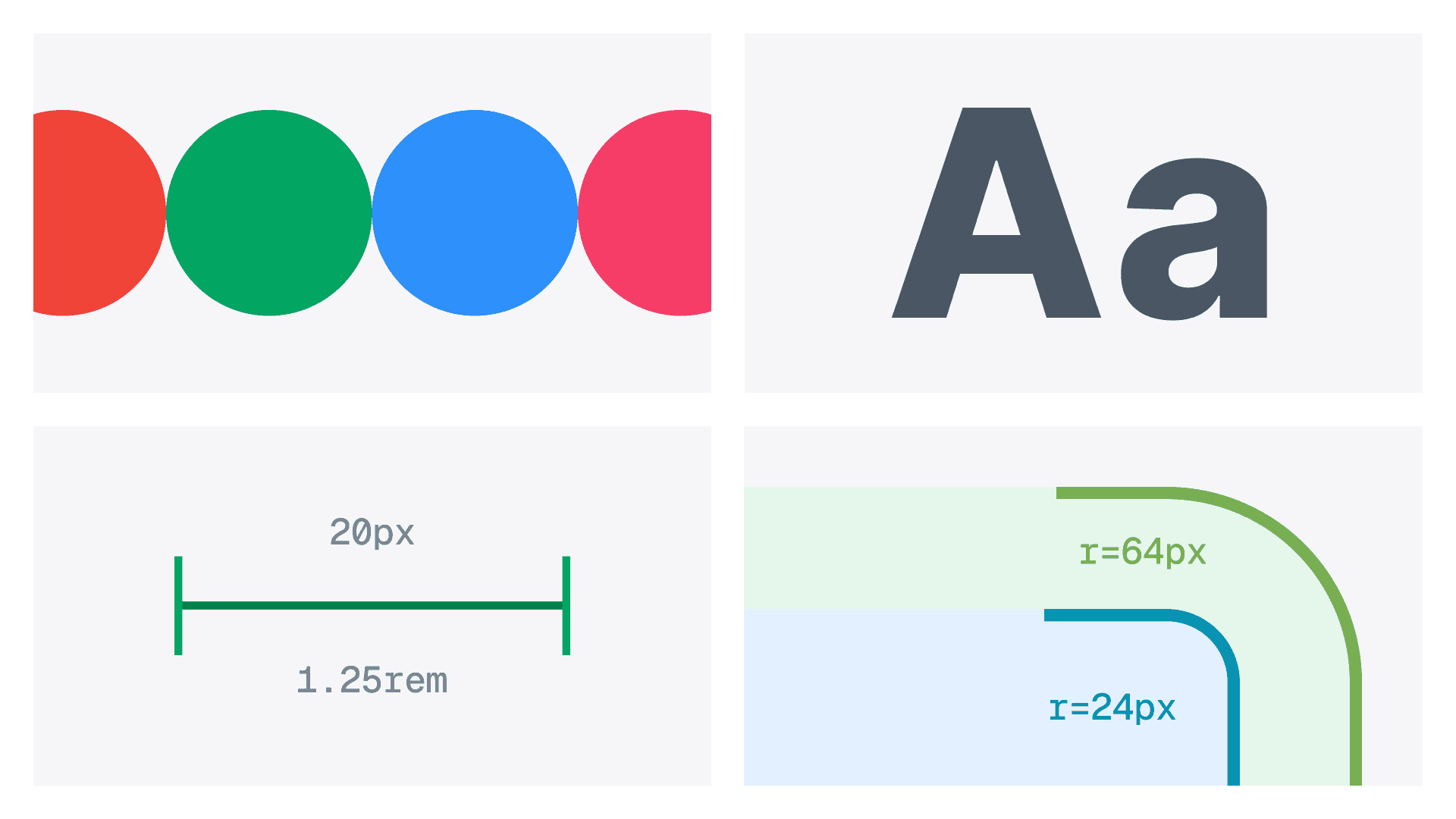
The foundation of our design system is like the fundamentals of a solid trading strategy, each element plays a vital role in achieving seamless execution. It brings together Colors, Typography, Iconography, Spacing & Radius, Border Width, and Shadows & Effects. Just as every trade requires balance and precision, these elements work together to create a cohesive and intuitive experience. Colors signal meaning, typography ensures clarity, icons provide quick recognition, while spacing, borders, and shadows maintain structure and flow. This foundation ensures the design stays consistent, scalable, and ready for whatever market conditions (or new features) come our way.
Where this starts
When I describe Leverage's foundations, I mean the token layer: spacing, color, typography, radius, borders, iconography. The unglamorous, unphotographable, structurally critical work that sits underneath every component and every screen.
This document walks through how each of those got built. Color first, because it was the most complex: dark mode was a new requirement for this revamp, it required the most iterations, and it's where the most stakeholder pressure lived. Then spacing, typography, radius, borders, and iconography to close out the layer.
Color
Color was the part where the system meets the brand, and where the most consequential decisions live.
It was also where the scope grew beyond the original brief. The previous MIFX platforms mainly supported light mode, with an option to go to dark mode only on the chart UI. For this revamp, dark mode became a hard requirement.
The reasoning was grounded in trading hours. FX markets run 24 hours a day, five days a week, but the sessions aren't equally active. The US session is one of the highest-volume windows globally. From Indonesia, that session runs from late evening into the early hours of the morning. Traders working through it are on their phones in dark rooms. A fully white interface at 1am is a usability problem, and a product credibility one: a platform that positions itself around serious trading should look considered at the moments when serious trading actually happens.
Dark mode wasn't a cosmetic addition. It was a product decision tied to when MIFX's most active users actually trade. And it meant every color decision in the system had to work in two modes simultaneously, from day one.
That constraint immediately surfaced a problem with the existing palette. The neutrals from the previous design system were too blue-tinted to serve as a dark mode foundation. Blue-cast neutrals read cold and clinical in dark contexts, and more practically, they created tint conflicts with the blue already doing the buy-direction job. So almost everything started over. The only colors carried forward from the previous system were the brand colors: brand green and brand accent. Every other color family was rebuilt.
The green saga
Brand green was the longest single thread in the color work. The process behind it explains how the rest of the palette ended up the way it did.
The starting constraint was non-negotiable. MIFX's brand green exists at the company level, applies to MIFX and to Valutrades (the global counterpart), and isn't something a design system rebuild gets to vote on. You can refine. You can't replace. The exact color hex I have to work from is #00A562, right from the brand guidelines.

The problem surfaced as soon as I started testing. The brand green (#00A562) doesn't actually meet contrast standards against white in light mode either. Against dark surfaces it technically passes, but the result looks dull and flat, not the kind of color that makes a CTA feel worth tapping. So the brand green wasn't a color that worked in one mode and broke in the other. It was a color that didn't fully work in either, and the brief was still to make it work in both.
My first instinct was the obvious one: pick a lighter, more saturated variant of the green specifically for dark mode. I tried a range.
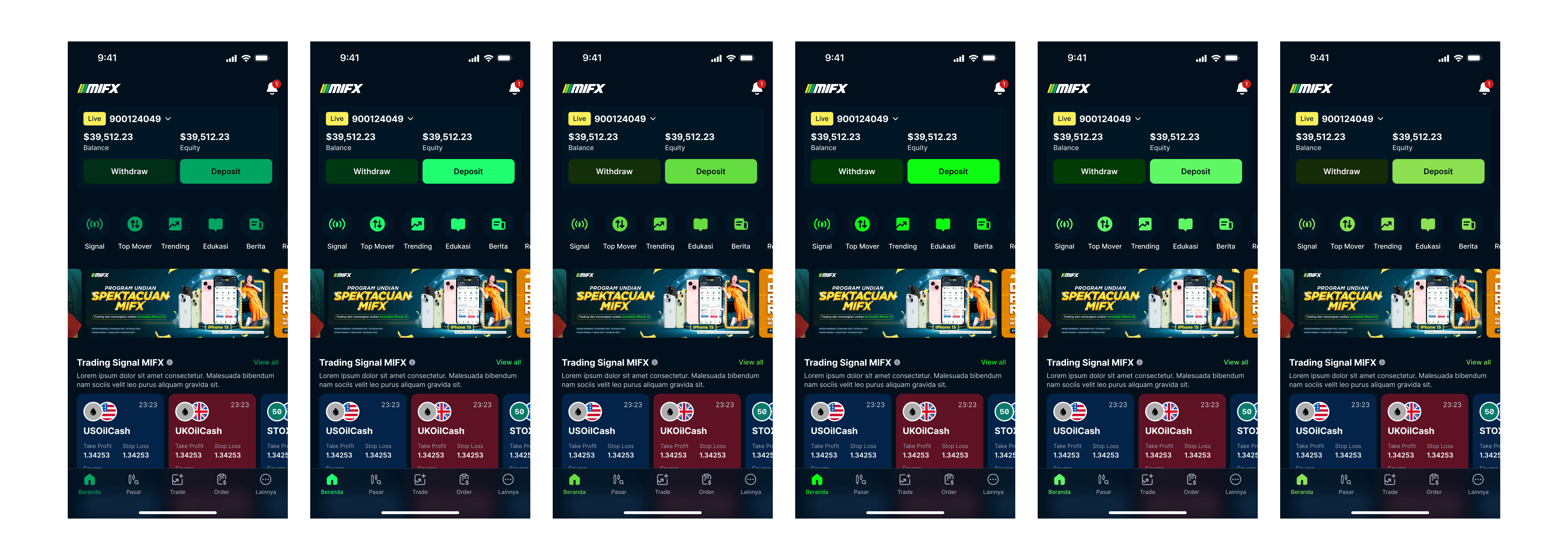
When I brought proposals to leadership, I didn't present color swatches. Because the revamp UI was being designed in parallel, I could show each candidate green applied inside actual product screens: real MIFX home screens in dark mode, with the green running consistently across buttons, icons, and navigation. I also handed them a working prototype of each option, so they could evaluate how it felt in their hands rather than as a flat slide. The goal was to give them the clearest possible picture of what a decision meant before they made it.
They were rejected anyway. Some of the rejections were legitimate ("doesn't feel like us" is a real concern from people who own the brand and trust their gut on it). Some of them were more subjective. One was, more or less, feng shui.
So lighter-variant-for-dark-mode was off the table. I needed a different path.
I went looking at how other green-brand products handle the same problem. WhatsApp was the obvious reference as it's an everyday app we all use (at least in Indonesia). They're aggressively green, they support both light and dark mode at massive scale, and they've clearly been through the same accessibility math I was facing. I studied not their specific colors but the relationship between their light-mode green and their dark-mode green. There's a perceptual shift between the two, a pattern in how lightness and chroma move, and I took that shift as a method I could apply to MIFX's own green.
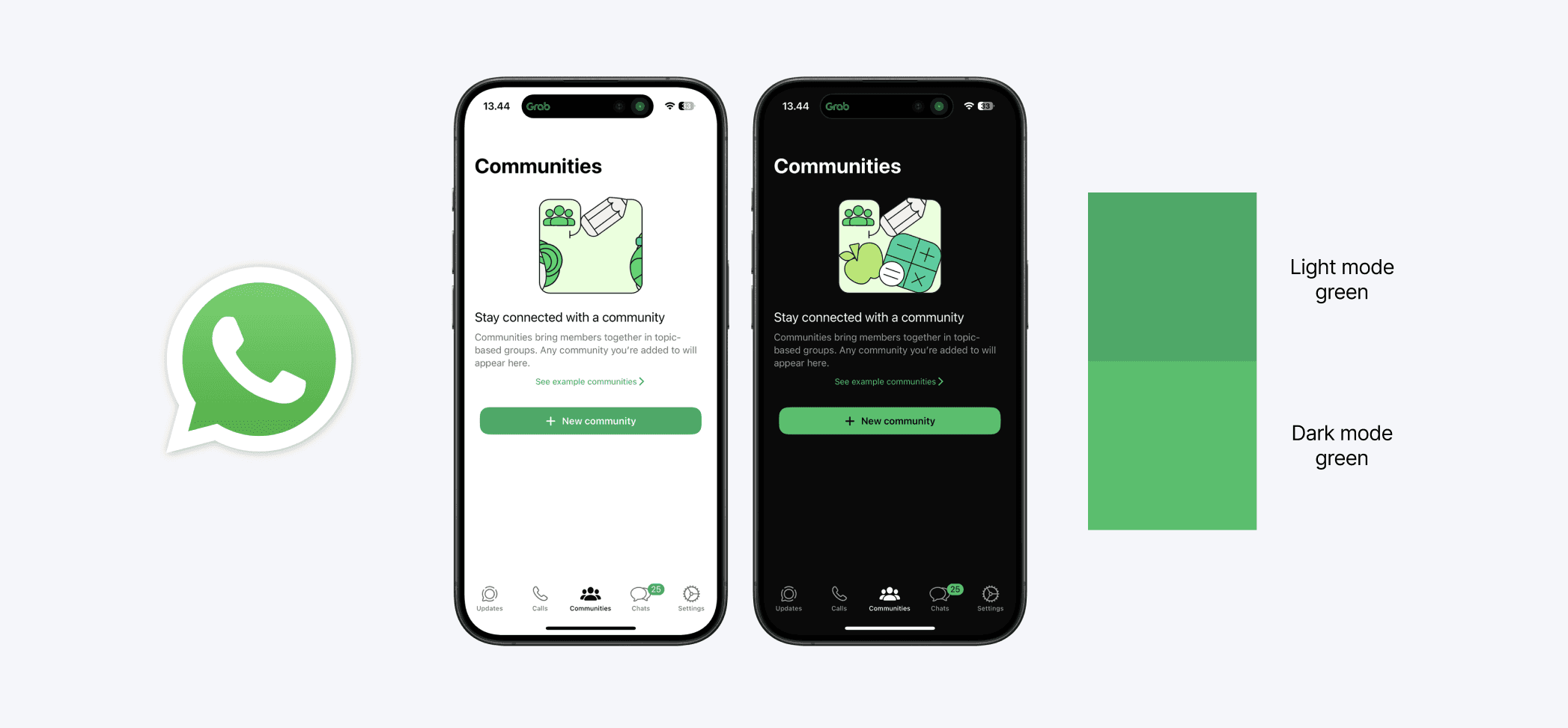
WhatsApp's implementation of their green.
A two-ramp approach was reasonable enough to consider seriously. A brand-light ramp scoped to light mode, a brand-dark ramp scoped to dark mode, each tuned independently. It would have solved the accessibility issue without forcing me to tune a single ramp through OKLCH space. But it would have doubled the maintenance surface and made brand green an architectural exception, since every other color in the palette is one ramp serving both modes through functional token resolution.

The compositional test sealed it: a status chip uses multiple steps from the same ramp at once (a light background with a darker foreground in light mode, polarity flipped in dark mode). For the component to read as one green status chip rather than two greens awkwardly stacked, the steps it composes have to feel like members of the same family. Two ramps would have had to maintain perceptual continuity anyway, which is essentially the same tuning problem with extra steps. One ramp was the more durable answer.
The technical work to make one ramp meet all the constraints was the longest part of the process. I used OKLCH as the color space because OKLCH is perceptually uniform: a step from lightness 30 to lightness 40 looks the same size of change regardless of hue, which is the property you need when you're trying to build 13 evenly-stepped families that look like they belong together. For most colors in the palette (red, orange, blue, the secondary colors) a fairly standard OKLCH ramp worked out of the box.
Brand green needed a custom path. The lightest steps had to stay perceptually MIFX-green rather than drifting toward pale mint. The darkest steps had to stay perceptually MIFX-green rather than drifting toward generic forest green. The mid-light and mid-dark steps had to relate to each other by something close to the WhatsApp shift I'd studied. And every adjacent pair had to maintain enough contrast for the compositional patterns components would use.
I tuned this by eye, iteratively, using colordesigner.io to generate and explore candidate ramps and oklch.com to verify perceptual uniformity and contrast at each step. There was no clean formula. OKLCH was the framework that made the problem tractable; the actual answer came from a lot of looking, comparing, and adjusting until everything held together.

Brand green palette end result.
The result is one brand green ramp, thirteen steps, that meets contrast in both modes, composes cleanly across every compound component, and still reads as MIFX green from any single step. It took weeks. Most of it would be invisible to anyone using the system. That's the nature of foundation work. You can tell whether someone has done it well by whether the rest of the system feels natural.
Brand accent: the color that earns its meaning by being rare
The other inherited brand color was the accent: a yellow that sits alongside brand green in MIFX's identity. Where brand green is the everyday workhorse, used in CTAs, success states, and primary brand expression across the platform, the accent is reserved for specific moments.
Two of them, in the whole system:
The Live account badge
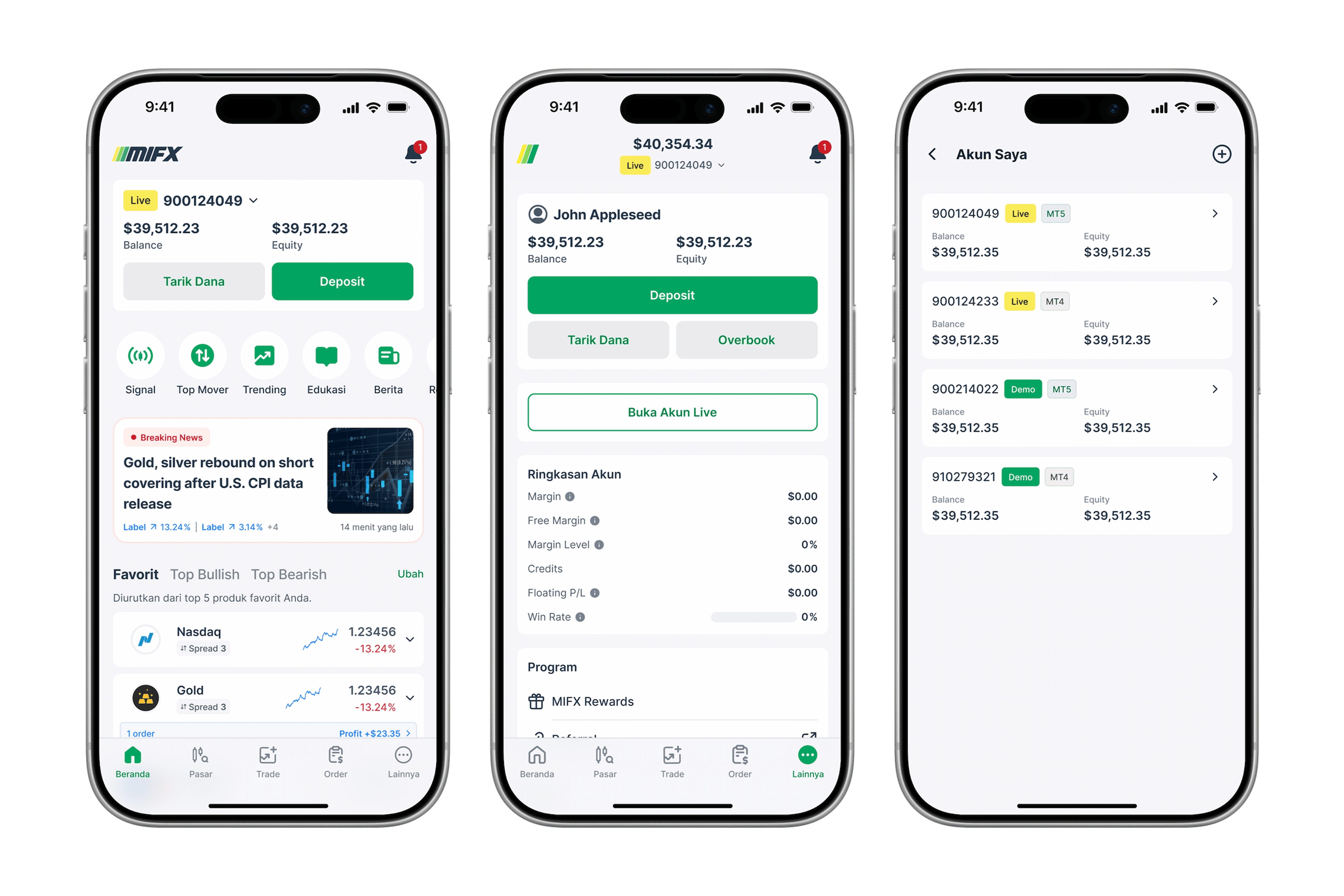
MIFX users can hold both Demo accounts (practice, no real money) and Live accounts (real capital). The visual distinction between the two is critical and has to be unambiguous every time a user sees their account.
Demo badges use brand-green, which makes them feel like a familiar, safe part of the platform. Live badges use brand-accent, which sets them visually apart from everything else. Every time the user sees the yellow, they're being reminded they're in the real-money context. The scarcity of yellow elsewhere in the system is what makes that signal land.
Rewards elements
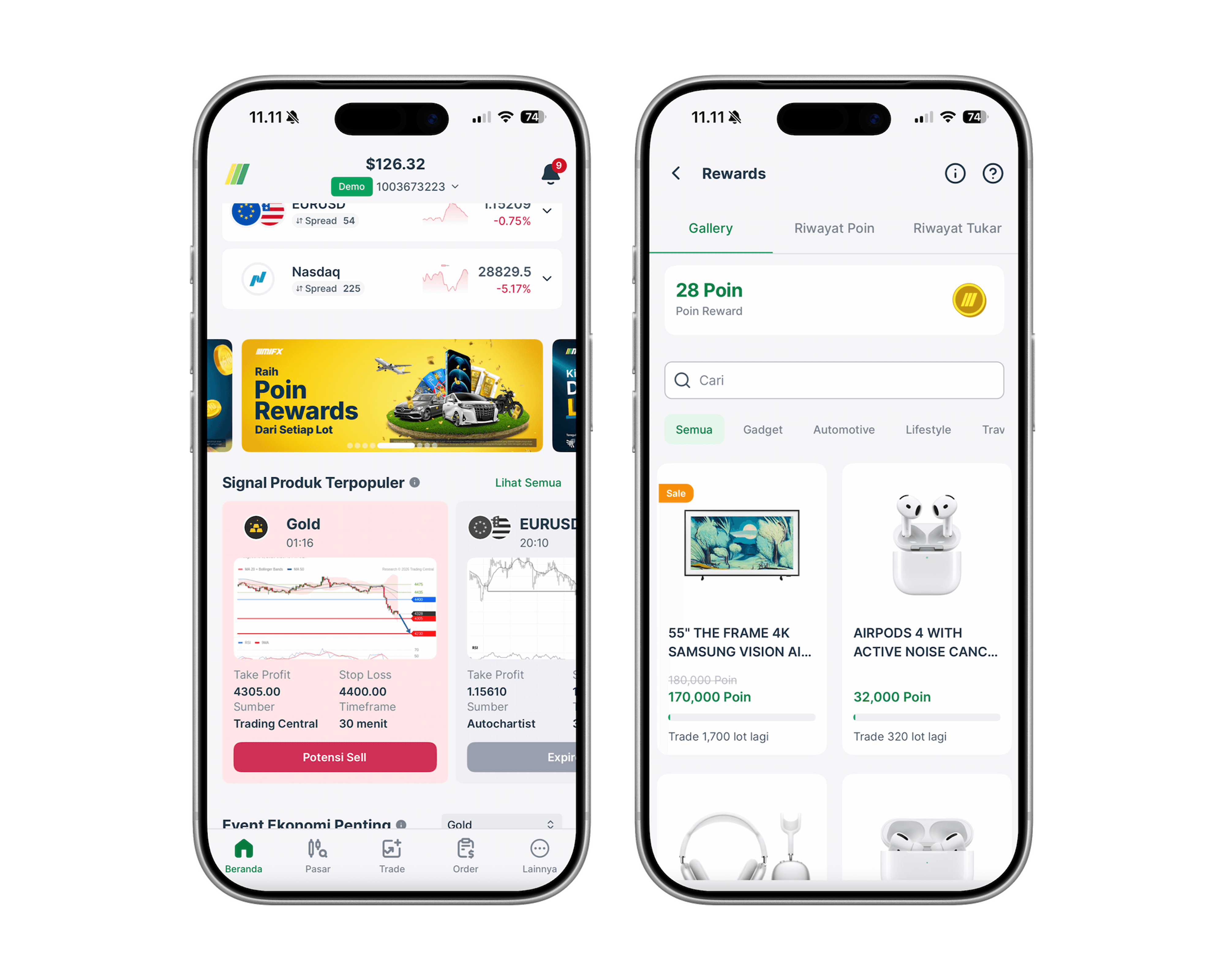
Rewards in MIFX are the celebratory parts of the product: bonuses earned, milestones reached, promotional moments. The accent's yellow has the right cultural register for this: it gestures toward gold and value without tipping into anything garish. When a user lands on a rewards screen, there's a subtle rewards element that immediately communicates "this is a different kind of moment."
The interesting thing about these two uses is that I didn't sit down at the start of the system and decide accent would be restricted to them. The restriction emerged. Across the whole rebuild, yellow simply never felt right anywhere else. It wasn't appropriate for general UI accents. It read too cheerful for sentiment work, where orange was already doing the warning job. It didn't belong on chart elements or data displays. So it stayed where it belonged, in the two places that earned it. Constraints that emerge from use are more durable than constraints that are imposed by policy, because nobody has to remember them.
Accessibility for brand accent was easier than for brand green. Yellow occupies the high-lightness region of OKLCH space even at full saturation, which means it stays readable against dark backgrounds without needing the kind of custom ramp work green required. The accent palette generated cleanly from a standard OKLCH ramp and met contrast in both modes without significant intervention. The hard color work in the system was green; everything downstream benefited from green being solved first.
Sentiments vs Directions
Before any individual sentiment color got decided, one architectural question had to be answered: how should the system treat sentiment (good, bad, attention-worthy) versus direction (buy, sell)?
Most trading platforms collapse them. Green = success = buy. Red = danger = sell. The problem is that these are not the same things, and treating them as the same thing creates category errors that compound. A successful logout is not a buy. A failed deposit is not a sell. If a "success" toast looks the same as a "buy executed" indicator, the visual language is lying about what's happening.
So I split them.
Success / Danger / Warning are sentiment colors. They tell the user whether an action or state is good, bad, or worth caution. Used in toasts, validation, system messages, errors.
Buy / Sell are direction colors. They tell the user which way a trade is going. Used in order flows, position displays, P&L indicators, market data.
This split lets each family do its job without semantic interference. It also shaped every individual color decision that followed: which colors could be reused, which had to be unique, and which combinations the architecture had to keep apart.
Sentiment colors
After the two brand colors were settled, the next decisions were sentiment: the colors that tell users whether something is good, bad, or worth their attention. Most of these were straightforward, with two genuine puzzles.
Success uses brand green color directly
No new color. A positive outcome and the brand are aligned, which is convenient for a green-branded product. This lets brand green carry double duty (identity and positive sentiment) without anything competing for the role.
Brand green palette end result.
Danger is red
The conventional answer, and the correct one. Red is the universal sentiment for errors, destructive actions, failures. There was no reason to invent something else, and the cost of being non-standard here would have outweighed any benefit.

Red as danger color
Warning: orange, not yellow
The conventional warning color is yellow. I went with orange instead, for three reasons that stacked.
First, yellow was already taken. Brand accent occupied that hue, and that color does very specific work in the system (Live account badges, Rewards flow). Reusing yellow for warning would have created semantic collision: a user couldn't tell at a glance whether yellow meant "you're in the real-money context" or "something needs your attention." A color should do one job in the system. Yellow's job was already assigned.
Second, yellow is genuinely hard to make work in light mode. To meet contrast against a light background, yellow has to be pushed darker in OKLCH space, and as its lightness drops, the color desaturates and shifts toward olive, mustard, brown. By the time it's contrast-compliant, it isn't visibly yellow anymore. A "warning yellow" that reads as brown defeats the point of choosing yellow in the first place.
Third, orange doesn't have that problem. Orange holds its identity across a much wider range of lightness values. A dark orange still reads as orange. A light orange still reads as orange. The same palette can serve both modes without losing its meaning. Orange could do the warning job cleanly where yellow couldn't.
So orange wasn't a stylistic preference. It was the only color in the warm half of the spectrum that satisfied all three constraints: not reserved for brand, technically viable across both modes, and recognizably warning-coded to a user.

Orange as warning color
Direction colors
After the two brand colors were settled, the next decisions were sentiment: the colors that tell users whether something is good, bad, or worth their attention. Most of these were straightforward, with two genuine puzzles.
Buy direction is blue
Inherited from the previous color system. Blue had already been doing the buy-direction job at MIFX and there was no good reason to change it.

Blue as buy/profit color
Sell: the search for a not-quite-red
Sell was the harder color decision in the whole system because every obvious answer had a problem.
The conventional answer in most trading UIs is sell = red. That was off the table for two reasons.
The first is product mechanics. MIFX is a futures platform, not a spot platform. In spot trading, selling usually means exiting a position you held: red for sell reads as "get out" or "loss," which makes sense when sell is the unwanted-but-necessary end of a trade. In futures, sell is not an exit. Sell is going short, which is just as much a normal trade direction as going long. A futures trader who sells isn't leaving the market, they're betting the price will fall. Coding sell as red would have communicated something untrue about the product: that one direction was desirable and the other was a sad consequence. The product doesn't take that position, so the color system shouldn't either.
The second reason was that red was already doing sentiment work as danger. If sell were also red, sell-direction and danger-sentiment would visually collide. A "sell executed" indicator and a "transaction failed" indicator would look the same. The system would be coding two unrelated things with the same color, and users would have to disambiguate based on context. That's the kind of category error that compounds.
So red was out. The question became: what color is the right answer for sell?
I knew what I needed. Something still in the red family, so it would read as "the opposite of buy-blue" in directional pairings. But far enough from red that it wouldn't collide with danger-sentiment. And serious enough to match MIFX's brand register, which is regulated-financial-platform, not consumer-app.
Pink was the obvious place to start exploring, but I didn't aim for pink as a destination. I started from red and shifted, looking for "still red, but not danger-coded." As I worked through the hue space, the result naturally landed in pink-adjacent territory. I accepted it.

Rosé as sell/loss color
The name "rosé" did some work too. Calling the token "pink" or "salmon" would have signaled "this is a casual color" to anyone reading the system. "Rosé" reads as deliberate, with its own register. The naming reinforced the intended use.
What ended up in the system is a rosé that pairs cleanly with brand blue for the buy/sell pairing, sits distinctly apart from red in the sentiment family, and holds its own as a serious color rather than reading as candy-pink. Three constraints, satisfied simultaneously, through exploration rather than targeting.
The interesting thing about these two uses is that I didn't sit down at the start of the system and decide accent would be restricted to them. The restriction emerged. Across the whole rebuild, yellow simply never felt right anywhere else. It wasn't appropriate for general UI accents. It read too cheerful for sentiment work, where orange was already doing the warning job. It didn't belong on chart elements or data displays. So it stayed where it belonged, in the two places that earned it. Constraints that emerge from use are more durable than constraints that are imposed by policy, because nobody has to remember them.
Accessibility for brand accent was easier than for brand green. Yellow occupies the high-lightness region of OKLCH space even at full saturation, which means it stays readable against dark backgrounds without needing the kind of custom ramp work green required. The accent palette generated cleanly from a standard OKLCH ramp and met contrast in both modes without significant intervention. The hard color work in the system was green; everything downstream benefited from green being solved first.
The resulting architecture
All of these decisions produced a three-layer color architecture.

Layer 1: primitives
Neutral, Brand Green, Brand Accent, Red, Orange, Blue, Rosé as primary colors. Purple, Teal, Cyan, Lime, Fuchsia as secondary.
Each color has a full tonal scale from /min through /50, /100, /200, … /900, /950, /max. Plus a separate Alpha Transparency set for overlays (white, black-neutral, true-black, brand-light, brand-dark, accent, red, orange, blue, rosé, each in transparency ramps).
Layer 2: functional roles
Text, Background, Icon, Border. Each with its own internal hierarchy:
texthas:primarysecondarytertiarydisabled,
backgroundhas:bg-basebg-elevation-1bg-elevation-2bg-elevation-3,
borders have:
primarysecondarytertiaryquartenary,
icons have semantic-base variants.
Every functional token resolves to a primitive, and every functional role has a clear job.
Layer 3: surface and theme
The same tokens resolve correctly across Mobile App, Client Area, Website, and IB Dashboard, with light and dark modes built in via Figma Variables. Switching theme is a single variable change.
Light and dark in parallel

Both modes were designed in parallel from day one. I considered building light first and adding dark later, but that path creates retrofitted token names like bg-gray-100 that work in light mode and look nothing like gray in dark mode. By doing them together, every token had to earn its semantic name in both modes simultaneously. There was no fallback to appearance-based naming, because the appearance changed.
Accessibility, with guidance

Do's and Don'ts inside the documentation
The color docs include a Do/Don't section with real contrast ratios on real MIFX strings.
Spacing
Spacing is where the rebuild's foundational principles became most visible.

Do's and Don'ts inside the documentation
The system is built on a 4px scale, expressed in rem, with 1rem = 16px. The rem part matters more than it sounds. It means the entire spacing system scales with user font-size settings (which is an accessibility win), and it means we can shift base unit later without rewriting every token.
Tokens are named with t-shirt sizing: none → 4x-small → 3x-small → 2x-small → x-small → small → medium → large → x-large → 2x-large → 3x-large → 4x-large → 5x-large → 6x-large → 7x-large.
Spacing is different between mobile and desktop. Each token resolves to different numeric values depending on breakpoint.
spacing-mediumis16pxon mobile while20pxon desktopspacing-largeis20pxon mobile while24pxon desktop
Designers don't need to think which one to use as they can select the mode using Figma's variable modes depending on which breakpoint they currently designing on.
Typography
The previous typeface was Gotham. It had to go for three reasons.
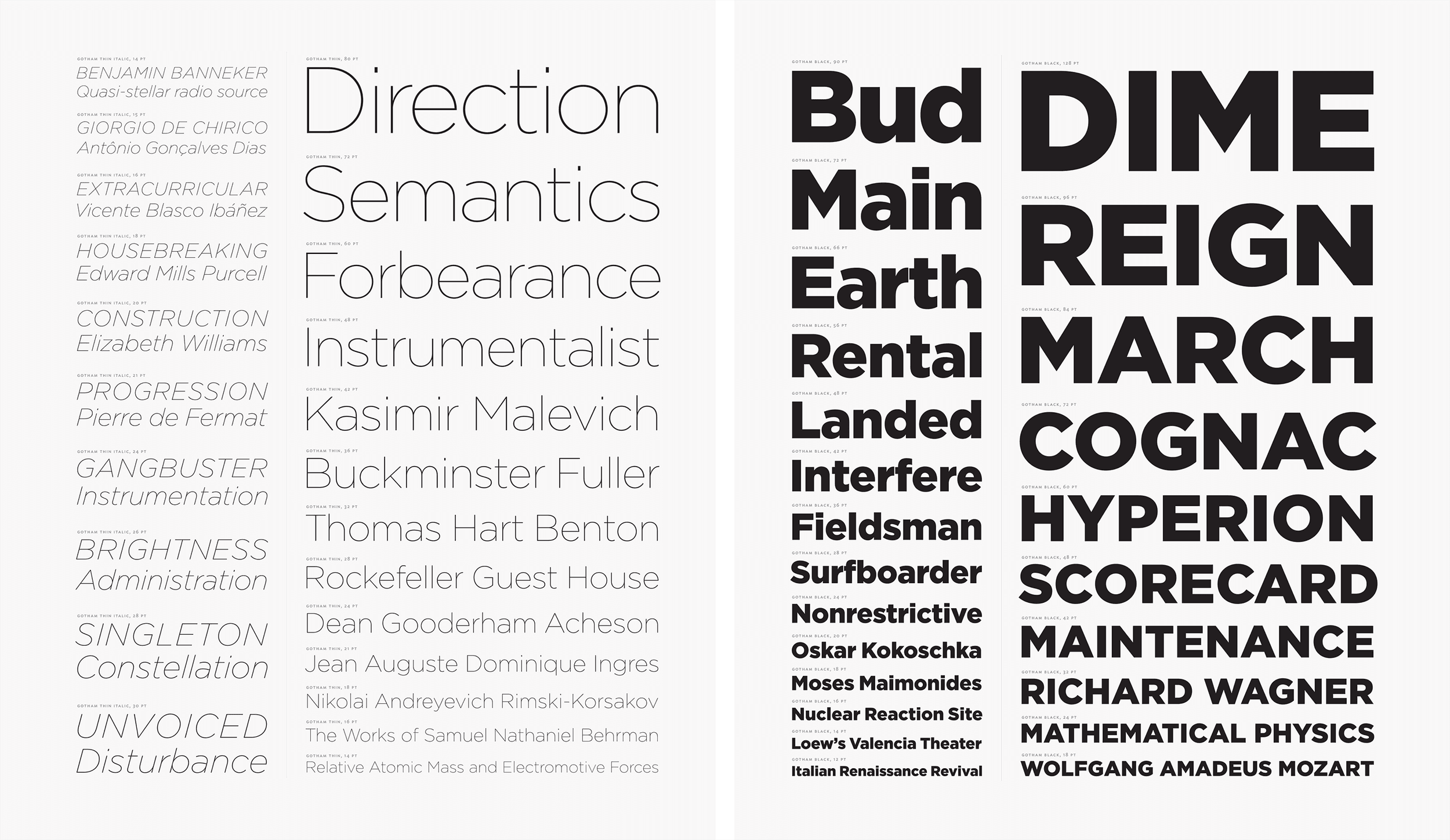
Gotham typeface, in action.
Limited weight range.
A UI design system needs a full set of weights (Regular, Medium, Bold at minimum, and ideally more) to do hierarchy properly. Gotham's available weights were too narrow.
Vertical metrics
Gotham has a relatively low x-height compared to its cap height. In long-form text it reads beautifully. In UI components that demand horizontal alignment, like a button with a leading icon and a trailing label, the visual center of the text doesn't sit where the eye expects. You end up nudging things by a pixel to compensate, which is exactly the 17.12px energy I was trying to leave behind.
Cost
Gotham is a licensed retail font, and the licensing scales with users and platforms. For a system that needed to deploy across four surfaces and was also planned to extend to Valutrades, MIFX's global counterpart, the recurring cost would have been substantial.
So Gotham was out. The question was what should replace it.
The SF Pro problem, and the path to Inter

San Francisco Pro (SF Pro) typeface, image taken from Apple Developer's site
Design leadership had a clear preference: SF Pro. Apple's system font, the typeface that defines the look of iOS, macOS, and most of Apple's software. It's a fantastic UI typeface: high x-height, neutral tone, optimized for screen reading at every size. It carries the implicit signal of "this is what well-designed software looks like." I understood the preference immediately.
The problem is licensing. SF Pro's terms allow use on Apple platforms only. You cannot legally use it on a website, on Android, in marketing materials, or in any surface outside Apple's ecosystem. For MIFX, which deploys across App (iOS and Android), Client Area (web), Website (web), and IB Dashboard (web), that's three quarters of our surfaces immediately off the table. And Valutrades, the global counterpart we were planning to extend to, would have the same problem.
Design leadership didn't know about this constraint when they expressed the preference. They thought SF Pro could be licensed for general use. So part of my job was operational research, not just design work: figuring out exactly what SF Pro's license permits, what it doesn't, and what that meant for a multi-platform system.
The conversation happened in two parts. First, I walked leadership through the licensing reality before proposing any alternative. Once they'd absorbed the constraint, they wanted to see what an alternative would look like. That's when I brought mockups: real MIFX screens rendered in Inter, the typeface I was proposing as the closest legitimate substitute. Inter was designed by Rasmus Andersson (formerly of Spotify and Figma) specifically as a high-quality, freely-licensed UI typeface optimized for screens. High x-height, generous spacing, neutral tone, nine weights from Thin through Black. It's not a clone of SF Pro, but it lives in adjacent territory.
The sequencing of those two conversations mattered. Leading with mockups would have made the conversation aesthetic, and leadership might have rejected Inter for not feeling identical to their SF Pro mental model. Leading with licensing shifted the question from "which face is best" to "which face is best under our actual constraints." Inter wins that question cleanly. The team's preferred aesthetic survived. The path to it was different from what they initially imagined.

Why Inter, beyond licensing
Inter also solved every problem Gotham had been creating. The wide weight range let the type system do real hierarchy work. The high x-height meant text read correctly inside UI components without per-pixel nudging. And being open-source under the SIL Open Font License, it scales to any number of users, platforms, and surfaces at zero cost.
Before settling on Inter, I briefly considered using each platform's native system font: San Francisco on iOS, Roboto on Android, system-ui on the web. This is the conventional "respect the platform" answer, and it has real merits. I raised it with my design leader and the director of Product Marketing. We landed on a single face across all platforms instead. For a regulated financial product where trust and brand consistency matter, a single voice across every surface was more valuable than platform-native feel. A user opening MIFX on iOS and then on the website should feel like they're in the same product, not two cousins. There's also a less glamorous edge case worth naming: some platforms let users set any font as the system default. A regulated financial trading platform rendered in Wingdings is, technically, possible under that model, and not a branding problem we needed. For a casual consumer app, the answer might be different. For MIFX, consistency won.
The product / marketing dual-track

Like spacing, type has two sets of values. The same semantic name (heading-1, body, caption) resolves to different specs depending on whether you're in a product-platforms context (the App, Client Area, IB Dashboard) or a marketing-platforms context (the Website).
heading-1 is 56px / 3.5rem on product. 72px / 4.5rem on marketing. Product UIs need to be tight and information-dense. Marketing pages need to be loud and rhythmic. Same name, different expression.
Tabular figures
Every numeric UI element (prices, balances, P&L) uses tabular figures globally. Inter ships with them as an OpenType feature. The point is horizontal consistency: each digit occupies the same character width regardless of which numeral it is, so a price column doesn't shift left and right as values change.
A "1" takes the same horizontal space as an "8." Without this, live prices in a trading interface visually jitter as numbers update. It's especially noticeable in trading charts, where price labels on the Y-axis update continuously as the market moves. Proportional figures at that refresh rate would make the axis labels dance. Tabular figures makes them hold still. It's the kind of detail nobody notices when it's right and everyone notices when it's wrong.
Currency display

The type docs include guidance on how to display multi-currency amounts unambiguously. Use the currency symbol when context is clear. Use the currency code (USD, SGD) when context could be ambiguous. Use both when extra clarity is needed. A small thing that prevents real user confusion in cross-currency deposit flows. This is especially useful on Valutrades' context where we support more currency in the platform.
Non-Latin languages

Unfortunately, Inter doesn't cover Arabic, Chinese, or Cyrillic. For surfaces serving those languages: SF Pro family on iOS, Noto Sans on Android while Noto Sans is used for all marketing surfaces.
Spacing
Spacing is where the rebuild's foundational principles became most visible.
Do's and Don'ts inside the documentation
The system is built on a 4px scale, expressed in rem, with 1rem = 16px. The rem part matters more than it sounds. It means the entire spacing system scales with user font-size settings (which is an accessibility win), and it means we can shift base unit later without rewriting every token.
Tokens are named with t-shirt sizing: none → 4x-small → 3x-small → 2x-small → x-small → small → medium → large → x-large → 2x-large → 3x-large → 4x-large → 5x-large → 6x-large → 7x-large.
Spacing is different between mobile and desktop. Each token resolves to different numeric values depending on breakpoint.
spacing-mediumis16pxon mobile while20pxon desktopspacing-largeis20pxon mobile while24pxon desktop
Designers don't need to think which one to use as they can select the mode using Figma's variable modes depending on which breakpoint they currently designing on.