
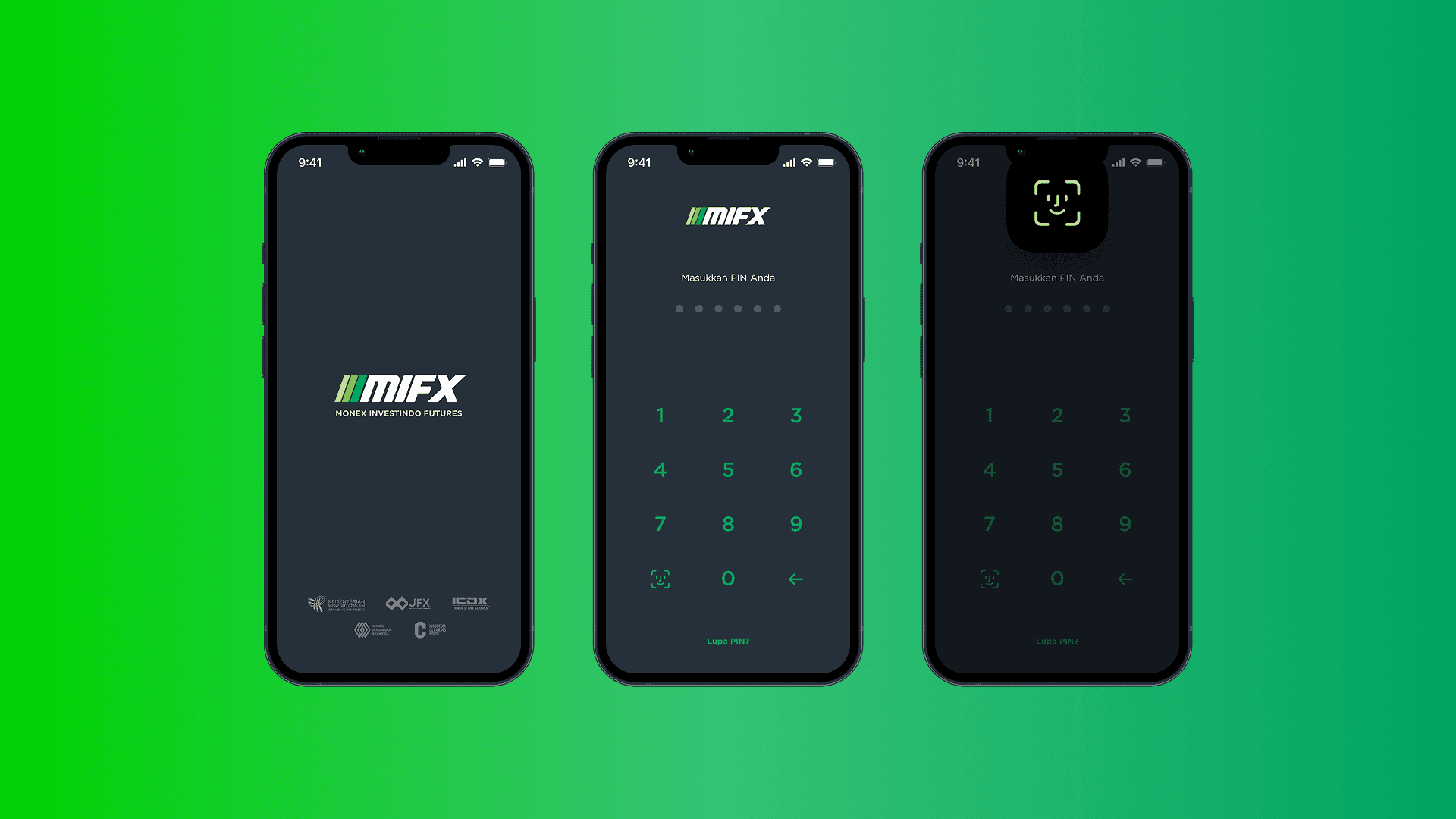
Fixing the Invisible: How I reduced biometric auth failures by 95.23% without touching the UI
Biometric authentication is designed to make fintech apps both secure and convenient, but when biometric tokens fail, the experience quickly turns frustrating. Earlier in 2024, our app suffers a critical issue caused biometric tokens to flush from the cache at an alarming rate—peaking at 97% in a single week—forcing users to fall back on PINs and undermining the feature’s purpose. This project explores how I tackled this invisible problem by reworking the caching and token management logic, reducing the biometric failure rate from a 69.3% weekly average to just 3.3%. While no UI changes were made, this fix significantly improved reliability, restored user trust, and enhanced the overall experience.
Year
2024
Service
Problem Solving
Category
Usage Analytics
Tool
Mixpanel
Background
In fintech, there’s always a balancing act between security and convenience. On one hand, users want their accounts to be safe—especially when real money is involved. On the other hand, no one wants to jump through hoops just to log in. That’s where biometric authentication comes in: it’s fast, secure, and feels effortless.
After a certain period of time (months), though, everyone—Demo or Client—has to log in again with their username and password.
Why Biometrics?
So, why did we bother adding biometrics in the first place? It all comes down to making life easier for our users. Let’s face it—nobody loves typing in passwords or PINs, especially when they’re in a hurry.

Biometric authentication solves a lot of these problems:
It's Fast: No more typing. Just a quick fingerprint scan or a glance at your phone, and you’re in.
It's Secure: Unlike passwords or PINs, your biometric data is unique to you. It’s not something someone can guess or steal easily.
It's What Users Expect: Let’s be real—biometrics are everywhere now. If your phone supports it, you probably expect your favorite apps to support it too, especially when it comes to something as important as your finances.
For us, biometrics were a no-brainer. They let us keep Client accounts secure without making the login process feel like a chore. Users could log in quickly and securely, and the whole experience felt modern and seamless.
The Problem
Uncovering the Problem
The first sign of trouble came from user feedback. We started hearing complaints that biometric logins weren’t working as expected. Users reported being forced to reauthenticate with their PINs, even though they had already set up biometric login. At first, we didn’t have enough data to pinpoint the issue. Biometric logins weren’t something we had been tracking in detail, so we decided to start collecting data in early April 2024 to get a clearer picture of what was going on.
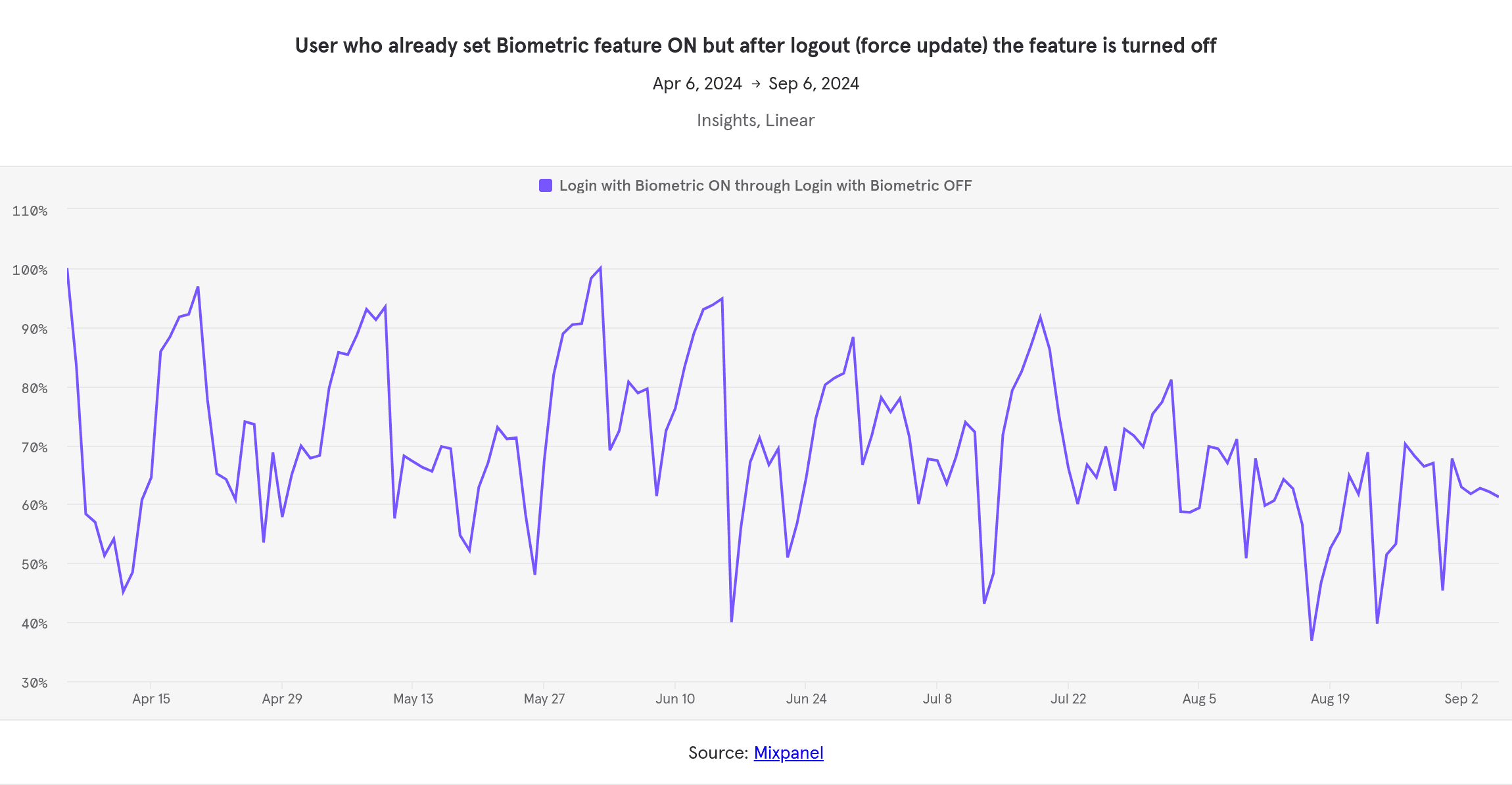
Daily Biometric Token Flushing Before Logic Fix
The data we gathered over the next three months revealed a troubling pattern. As shown in the analytics, there were several noticeable spikes in biometric login failures during this period. These spikes weren’t random—they coincided perfectly with the deployment of our app’s force updates.
💡
Yes, we deploy on Saturdays. On most industries, deploying on weekends are considered forbidden. But on our industry, it's safest time to deploy because the market is closed on weekends. Our app only handled withdrawals, deposits, and fund transfers between accounts on weekends. Minimal chance it will interfere with trading activity (which is the most time-sensitive flow in our platform) in case the update breaks production.
What we didn’t realize at the time was that this process also affected biometric tokens. When users were logged out during a force update, their biometric settings were essentially wiped, requiring them to set up biometric login all over again. This wasn’t just an inconvenience—it completely undermined the reliability of the biometric feature.
The spikes in the data made the connection clear: every time we deployed a force update, biometric tokens were being flushed, and users were left frustrated. This insight was the turning point that helped us zero in on the real problem.
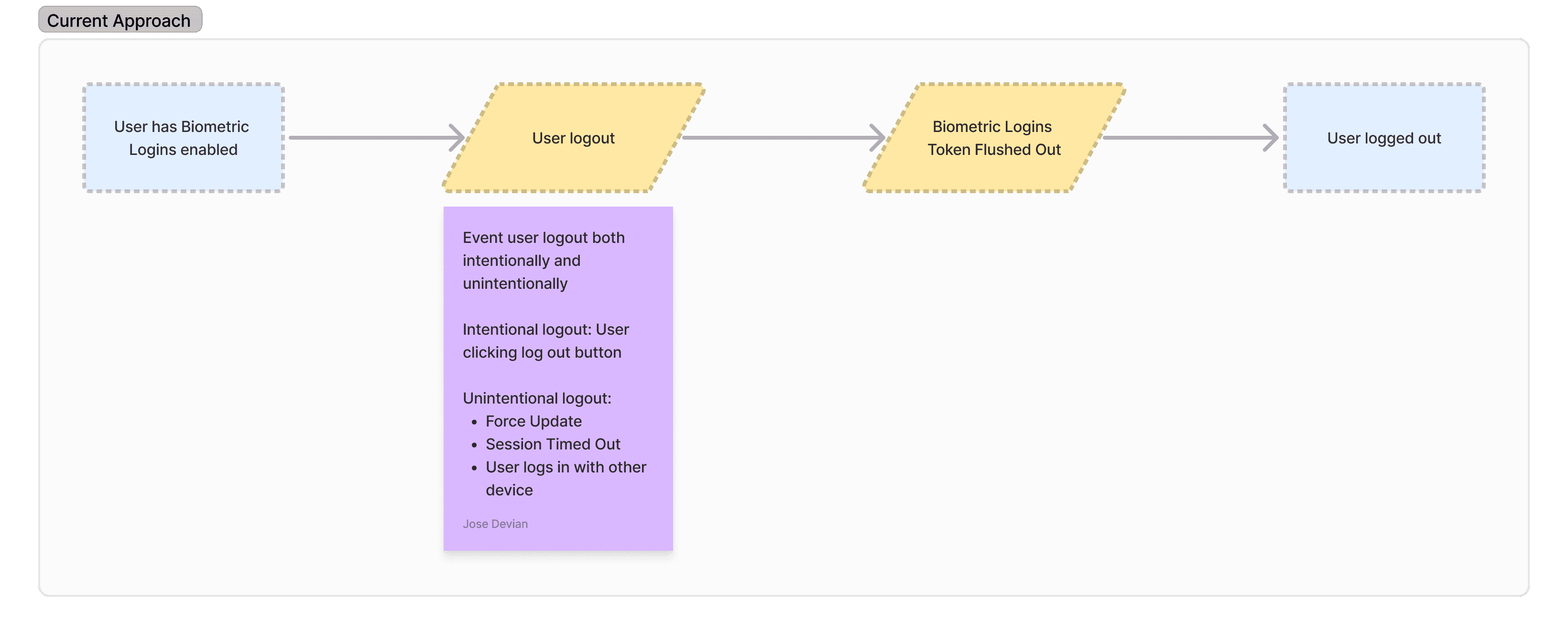
What Happens When User Logs Out?
Regardless of whether the logout is intentional or unintentional, the system followed the same logic:
Session Data Cleared:
The user’s session token is invalidated and removed from the app’s cache. This ensures that the session cannot be reused, which is critical for security.
Biometric Token Flushed:
Here’s where the problem arose. Along with the session token, the biometric token was also being cleared during logout. This meant that even if a user had previously set up biometric login, they would need to reconfigure it after logging back in.
The Fix
The main issue with the previous logic was that biometric tokens were being flushed during every logout, regardless of whether the logout was intentional or unintentional. This created unnecessary friction for users, as biometric tokens are stored locally on the device and don’t pose the same security risks as session tokens. Flushing them during logout events—especially unintentional ones like force updates—meant users had to repeatedly reconfigure biometric login, which was frustrating and undermined the feature’s reliability.
To make matters worse, unintentional logouts occurred far more frequently than we initially thought. Users were being kicked out of their accounts regularly due to forced logouts during app updates, invalid tokens from backend services, session timeouts, and other system-triggered events. These frequent disruptions amplified the frustration, as users were forced to reauthenticate and reconfigure biometric login far more often than they should have.
To fix this, we revamped the logic to ensure that biometric tokens are preserved across all logout events while still maintaining security through validation.
The New Approach
Under the new logic, biometric tokens are no longer cleared during any logout event. Instead, they are securely stored locally on the user’s device and validated during the next login to ensure they belong to the correct account.
Here’s how the new logic works:
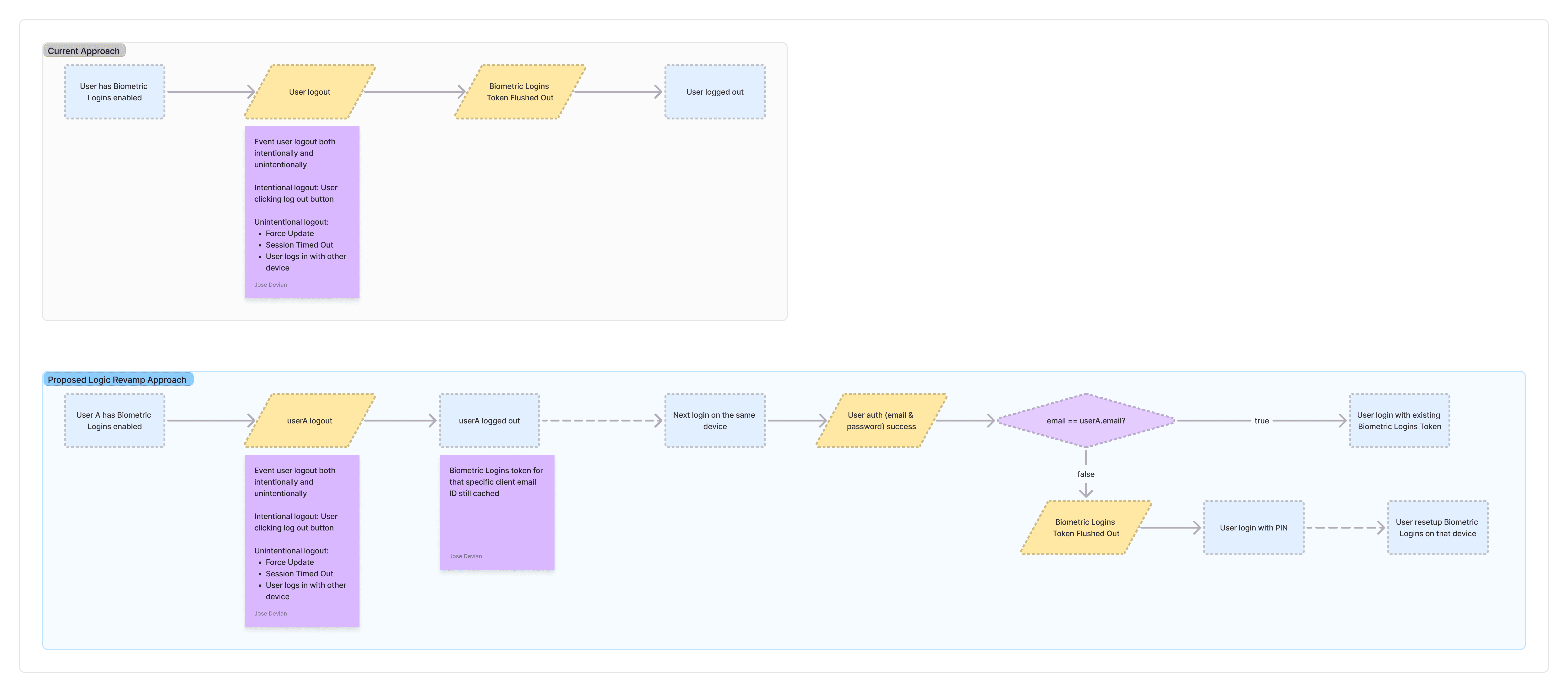
Preserve Tokens Locally
Biometric tokens are now stored securely on the user’s device and are no longer tied to the session token. This means that even when a session token is flushed (e.g., during a force update or manual logout), the biometric token remains intact.
Unlike the previous logic, biometric tokens are no longer cleared during any logout event—whether intentional (e.g., the user manually logs out) or unintentional (e.g., force updates, session timeouts, or backend-triggered logouts). This ensures that users can seamlessly log back in using biometrics without needing to reconfigure the feature.
Validations for Security
To ensure security, we added a validation step during login. When a user logs in with biometrics, the app checks whether the stored biometric token matches the account being logged into:
If the email matches the account associated with the biometric token, the user is allowed to log in using biometrics.
If the email doesn’t match, the biometric token is flushed, and the user is required to log in with their credentials (username/password and PIN) and reconfigure biometric login.
The Impact
The changes we made to the logout and biometric token logic had a dramatic impact on the reliability of biometric logins. Before the fix, the average weekly biometric login failure rate was a staggering 68.9%, with a peak failure rate of 97.9% during some weeks. This meant that the majority of users who had set up biometric login were unable to rely on it, leading to frustration and a poor user experience.
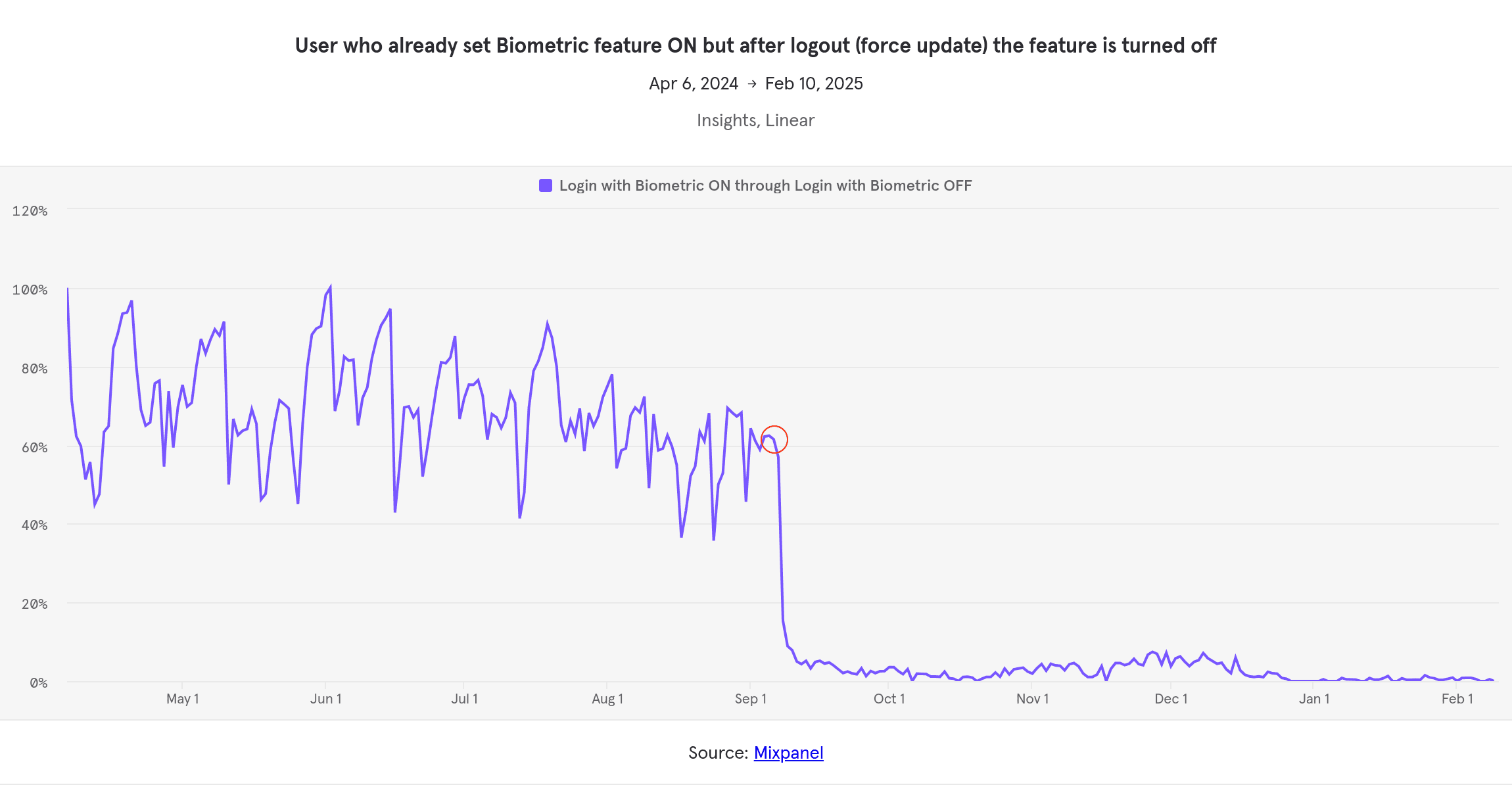
Conversion of Biometric Authentication Failures (daily), lower is better
After implementing the fix, the results were immediate and significant. The average weekly biometric login failure rate dropped to just 2.4%. This represents a 96.5% reduction in failures, transforming biometric login from an unreliable feature into one that users could depend on.
What This Means for Users
Seamless Login Experience
Users no longer have to reconfigure biometric login after being logged out, whether due to force updates, session timeouts, or other system-triggered events. This has made the login process faster and more convenient.
Restored Trust in the Feature
With biometric login now working as expected, users can trust the feature to provide a secure and hassle-free way to access their accounts.
Improved User Retention
By reducing friction in the login process, we’ve likely improved user satisfaction and retention, as users are less likely to abandon the app due to authentication frustrations.